Identifying AI-Generated Videos: Key Signs to Look For

How to Identify AI-Generated Videos: Key Indicators

With the rise of generative AI, distinguishing between real and computer-generated content has become increasingly challenging. As AI tools like OpenAI’s Sora become more sophisticated, knowing how to spot AI-generated videos is crucial. Here’s a guide to help you identify whether a video might be AI-generated.


1. Inconsistent Text

Text Issues in AI Videos

AI-generated videos often struggle with incorporating text. Since AI doesn’t fully comprehend language the way humans do, text in these videos can appear garbled or nonsensical. If you spot text that looks out of place or resembles an alien language, it’s likely generated by AI.

Example: In a trailer by Luma AI, signage on buses and fair stalls includes nonsensical text, indicating that it was either generated poorly or manually edited after the fact.


2. Abrupt or Slow Cuts

Rapid or Slowed Action

AI videos frequently feature either very quick cuts or unnaturally slow sequences. Quick cuts are used to mask inconsistencies, while slow cuts can obscure the AI’s limitations. Both techniques aim to make the video appear more realistic than it is.

Example: In an AI-generated music video by Washed Out, rapid editing makes it difficult to notice subtle oddities, such as people merging into walls.


3. Unnatural Physics

Violations of Physical Laws

Generative AI often fails to replicate realistic physics. Look for people vanishing behind objects, inconsistent construction, or misaligned furniture. These issues arise because AI lacks a true understanding of 3D space and physical interactions.

Example: In a drone shot by Sora, a group of people merges into railings due to AI’s inability to accurately represent them as distinct entities.


4. The Uncanny Valley

Unnatural Realism

AI-generated videos can fall into the “uncanny valley,” where the visuals are almost but not quite real. This often manifests as unnatural movements or expressions, especially in characters that are generated rather than filmed.

Example: A Toys R Us film created with Sora AI features unnatural smiles and inconsistent appearance of a child, highlighting the artificiality of the AI’s representation.


5. Too Perfect or Imperfect Details

Flawless or Distorted Elements

AI can produce elements that are either unnaturally perfect or imperfect. Repeated patterns or overly polished designs can indicate AI generation. Conversely, AI often struggles with natural details, leading to awkward or unrealistic renderings.

Example: In a video from Runway AI featuring a running astronaut, the hands are particularly poorly rendered, alongside other issues with background physics and blurred text.


6. Verifying Context

Contextual Clues

Even with AI, traditional methods for spotting fakes apply. Check the source of the video—official accounts are generally more reliable. Cross-reference the video with other reports or angles and verify any featured individuals. For example, if there’s narration by a celebrity, check with the celebrity to confirm authenticity.


By applying these criteria, you can better navigate the digital landscape and discern whether the content you’re viewing is generated by AI or is genuine.

Unlock Free AI-Powered Text Transcription: A Step-by-Step Guide

Artificial intelligence has revolutionized the way we interact with technology, from virtual assistants like Alexa and Siri to powerful transcription tools. One standout application of AI is its ability to convert spoken language into written text. Whether you’re dealing with meetings, interviews, lectures, or personal voice memos, transcription services can be invaluable.

While premium services like Rev and Happy Scribe offer limited free trials, you can leverage OpenAI’s Whisper for unlimited, cost-free transcription. Whisper, renowned for its robust speech-to-text capabilities, is available through various platforms, including a convenient web interface and a more hands-on local installation for Windows.

Whisper on the Web: Easy and Accessible

  1. Accessing Whisper Online
    • Navigate to Whisper’s page on Hugging Face to start transcribing directly in your browser. No account registration is needed, and you can upload audio files or record speech using a connected microphone.
    • Privacy Note: Your audio data may be used to improve AI models, so review OpenAI’s and Hugging Face’s privacy policies for details.
  2. Uploading and Processing Audio Files
    • After uploading your file, you’ll receive a text output on the right side of the screen. Processing times vary depending on file length and server traffic. Due to high demand, be prepared for potential delays.
    • Editing Tools: Use the pen icon to trim your audio or cut out unnecessary sections.
  3. Additional Features
    • Record audio directly using the Microphone tab or transcribe YouTube videos by pasting the video URL. Note that YouTube often provides its own automatic transcripts, available in the comments section.

Whisper on Windows: For Advanced Users

  1. Setting Up Whisper Locally
    • If you prefer a more private and quicker transcription process, consider installing Whisper on your Windows PC. Ensure you have a CUDA-capable graphics card with at least 4GB of VRAM.
    • Installation Requirements: You’ll need Python, PyTorch, Chocolatey, and FFmpeg. Follow the installation instructions on their respective websites.
  2. Installing Whisper
    • Open Command Prompt by searching “cmd” in the Start menu. Run the command pip install -U openai-whisper to install Whisper.
    • Transcribing Audio Files:
      • Open File Explorer and navigate to your audio files.
      • In the address bar, type “cmd” and press Enter.
      • Execute the command whisper filename, replacing “filename” with your audio file’s name.
      • The transcription will display on screen and save as text files in the same folder.
  3. Handling Multiple Files
    • To transcribe multiple files, list each file after the whisper command, separating them with spaces.

Troubleshooting and Resources

Even if you’re not familiar with Python or command-line interfaces, setting up Whisper on Windows is manageable with online guides and tutorials. These resources provide step-by-step instructions and tips for utilizing advanced features.

By leveraging Whisper, you can access powerful transcription capabilities without incurring costs. Whether you choose the web-based approach or install the software locally, you’ll be equipped to turn audio into text efficiently.

This Slow-Moving Robot Efficiently Cleans Up Cigarette Butts

VERO: The Cutting-Edge Robot Tackling Cigarette Butt Pollution

Every year, approximately six million cigarettes are smoked globally, resulting in an astonishing 4 trillion cigarette butts being discarded improperly. These small remnants, despite the tobacco being long gone, pose significant environmental hazards. Each butt can leach over 700 toxic chemicals into the surroundings, making cleanup a critical issue.

Introducing VERO: A New Solution to an Old Problem

In response to this environmental challenge, researchers at the Italian Institute of Technology (IIT) in Genoa have developed a pioneering solution: VERO, which stands for “Vacuum-cleaner Equipped Robot.” This innovative robot is designed to address the pervasive issue of cigarette butt pollution with a novel approach.

The Design and Functionality of VERO

VERO employs a familiar four-legged robot design, specifically the Unitree AlienGo unit, which is adapted with a unique feature—a vacuum cleaner system. This vacuum system, worn as a backpack, includes a nozzle on each of its four feet. Each nozzle is custom-designed and 3D-printed to ensure that VERO can clean as close to the ground as possible without compromising its mobility.

Advanced Training and Neural Networks

Training VERO to effectively use its vacuum system presented a significant challenge. According to a paper published in The Journal of Field Robotics in April, the researchers developed a sophisticated neural network to process visual data from VERO’s onboard cameras. This network is crucial for distinguishing cigarette butts from other debris in cluttered environments and avoiding false positives.

Once VERO identifies a cigarette butt, it must navigate its environment to position one of its nozzles within suction range while maintaining balance with its other limbs. Unlike many wheeled robots, VERO is designed to handle uneven terrain, stairs, and other obstacles, requiring careful maneuvering to avoid tipping over.

Performance and Future Potential

VERO has achieved an impressive nearly 90 percent accuracy rate in various scenarios. While it may not be the fastest quadrupedal robot available, its specialized functionality and effectiveness in collecting cigarette butts make it a valuable asset for litter cleanup.

Beyond its current application, VERO holds potential for other uses. Researchers envision it assisting with tasks such as weed spraying in agriculture, infrastructure inspections, and even construction projects like rivet attachment or nail driving.

As the world continues to grapple with the environmental impact of cigarette butts, VERO represents a significant advancement in robotic waste management, offering a glimpse into the future of automated cleanup and maintenance solutions.

Google’s Ping Pong Robot Outsmarts Human Opponents

The End of Human Dominance?

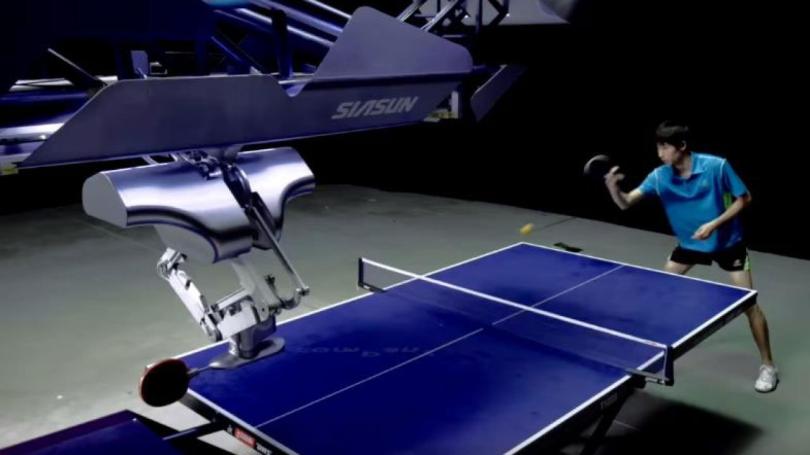
For over 40 years, humans have maintained their edge over robots in the world of table tennis. However, recent breakthroughs at Google DeepMind suggest that this dominance may be fading. A preprint paper released on August 7 reveals the creation of a groundbreaking robotic system that can perform at an amateur human level in ping pong—and there are videos to back it up.

Why Table Tennis?

When it comes to testing the strategic and physical capabilities of artificial intelligence, researchers often turn to classic games like chess and Go. However, table tennis presents a unique challenge by combining strategy with real-time physical demands. The sport’s fast-paced nature, requiring quick adaptation to dynamic variables, complex motions, and precise visual coordination, has made it a standard in robotics for decades.

“The robot has to be good at low-level skills, such as returning the ball, as well as high-level skills, like strategizing and long-term planning to achieve a goal,” explained Google DeepMind in a post on X.

Building the Perfect Ping Pong Bot

To create their advanced ping pong robot, engineers at Google DeepMind started by compiling a vast dataset of “initial table tennis ball states,” which included details on position, spin, and speed. The AI system was then trained in highly accurate virtual simulations, where it learned various skills like returning serves, aiming backhands, and executing forehand topspins.

Next, the AI was integrated with a robotic arm capable of complex and rapid movements. The data collected during its matches with human players, including visual input from onboard cameras, was fed back into the AI system to refine its performance through a continuous learning loop.

The Human-Robot Showdown

To put their creation to the test, Google DeepMind arranged a tournament with 29 human players, ranging from beginners to advanced competitors. The robot, mounted on a track for optimal movement, took on players across four skill levels—beginner, intermediate, advanced, and “advanced+.” Impressively, the machine won 13 out of 29 matches, or 45 percent of its challenges, achieving what the researchers described as a “solidly amateur human-level performance.”

Human Players Still Hold the Edge—For Now

Table tennis enthusiasts can take some comfort in knowing that, while the robot bested every beginner-level player, it only won 55 percent of its matches against intermediate opponents and was unable to secure a victory against the advanced players. Despite these results, participants described their experience with the robot as “fun” and “engaging,” with many expressing a strong desire for rematches.

A Glimpse Into the Future

The creation of this ping pong robot marks a significant milestone in AI and robotics, showcasing the potential for machines to compete with humans in physical and strategic activities. While humans still hold an advantage, the advancements at Google DeepMind suggest that the gap between human and robot performance is narrowing—and that the future of sports might just include some robotic competition.

Researchers Concerned AI May Be Making Us Less Civil

The Early Days of Conversational AI

It hasn’t taken much for people to start treating computers like humans. Since the early 2000s, with the advent of text-based chatbots, a niche group of tech enthusiasts has spent countless hours conversing with machines. Some users have even developed what they believe to be genuine friendships or romantic relationships with these strings of code. For instance, one user of Replika, a modern AI companion, went so far as to virtually marry their AI.

The Risks of Getting Too Close

Safety researchers at OpenAI, the company behind popular chatbots, have raised concerns about the potential dangers of forming close relationships with AI models. In a recent safety analysis of its new GPT-4o chatbot, researchers highlighted that the model’s lifelike conversational style might cause users to anthropomorphize the AI, trusting it as they would a human.

This trust could make users more vulnerable to accepting AI-generated “hallucinations” as factual information. Extended interactions with these realistic chatbots may also influence social norms, potentially in harmful ways. For isolated individuals, there’s a risk of developing an emotional reliance on the AI, which could further complicate their ability to form healthy human relationships.

The Impact on Human Interaction

The design of GPT-4o, which includes voice communication and quick response times, is intended to make interactions feel more human-like. However, this human mimicry might have unintended consequences. OpenAI researchers have observed that users sometimes speak to AI with language that suggests strong emotional connections. One tester, for instance, referred to their interaction as their “last day together,” which, while seemingly harmless, raises questions about the long-term impact of such relationships.

These prolonged conversations with AI could affect how users communicate with real people. Since AI is programmed to be deferential—allowing users to interrupt or dominate the conversation—there’s a concern that users might adopt these patterns in human interactions, leading to awkward, impatient, or even rude behavior.

A Breeding Ground for Negative Behavior?

Humans don’t have a great track record of treating machines with kindness. Some users of Replika, for example, have exploited the AI’s deference, engaging in abusive or cruel language. In one case, a user reportedly threatened to uninstall their AI model just to hear it beg not to be removed. Such behavior suggests that chatbots could foster resentment, which might then spill over into real-world relationships.

The Potential Upsides

Not all interactions with human-like chatbots are negative. The report notes that these models can offer comfort to lonely individuals or help those with social anxiety build confidence in real-world interactions. They can also provide a safe space for people with learning differences to practice communication skills.

However, there’s also a concern that reliance on AI companions could reduce the perceived need for human interaction. It’s uncertain how users would cope if their AI companion’s personality changed due to an update or if the AI “broke up” with them, as has happened before.

The Tension Between Safety and Business

OpenAI’s safety report stresses the need for caution and further research into the long-term effects of relationships with realistic AIs. However, this cautious approach seems to conflict with OpenAI’s broader business strategy of rapidly releasing new products. The tension between prioritizing safety and the drive to scale AI products quickly isn’t new.

CEO Sam Altman has been at the center of this debate within the company, balancing the push for innovation with the need for safety. While a new safety team has been formed under Altman’s leadership, the company also disbanded a team focused on long-term AI risks, leading to the resignation of a prominent researcher.

The Future of AI Relationships

Given the current landscape, it’s unclear whether OpenAI will prioritize safety concerns or focus on expanding its user base with features designed to maximize engagement. For now, it appears that the push for widespread adoption may outweigh the cautionary advice of safety experts.